
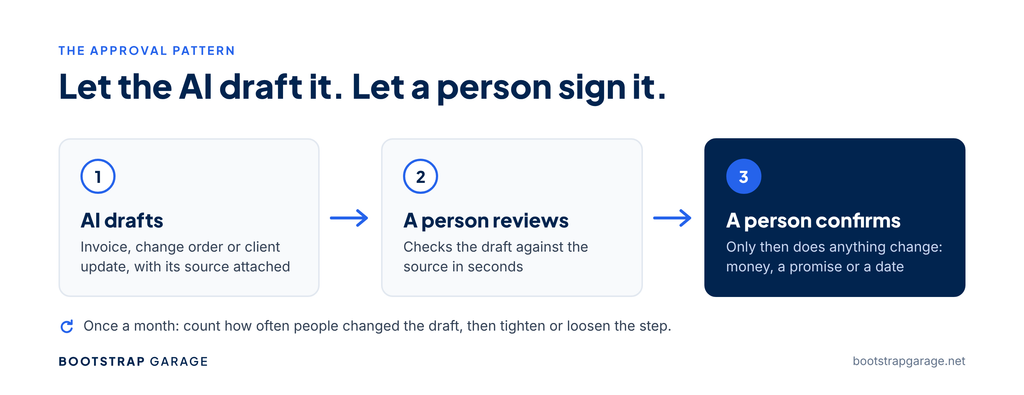
If you add AI to your office work this winter, copy the rule the big construction, property and accounting software makers have adopted: the AI prepares the work, and a person confirms it before anything changes.
The big vendors agree on one design
Look at what three large software makers announced in the past few weeks.
- Construction. On November 2, CMiC, which makes construction ERP software, launched NexusAI. You ask in plain language for a job, a budget or an invoice, and it creates them through a request, review and confirmation process. Every request runs within your existing security settings and user permissions (CMiC).
- Property management. On November 3, MRI Software said its Agora platform now runs more than 20 workflows with nearly 250 AI agents, including rent collections and lead-to-lease. Clients set the approvals that decide where staff review is required (MRI Software).
- Accounting. At Intuit Connect in late October, Intuit introduced Agentic Books Close, now in pilot. Its agents follow a firm’s own close procedures in QuickBooks, but nothing posts without explicit review, and every action leaves an audit trail (CPA Practice Advisor).
Three companies, three industries, one rule. These firms have more AI engineers than any contractor will ever hire, and they still put a person in front of anything that changes money or records. That is telling about where the risk is.
Why it matters more for a small contractor
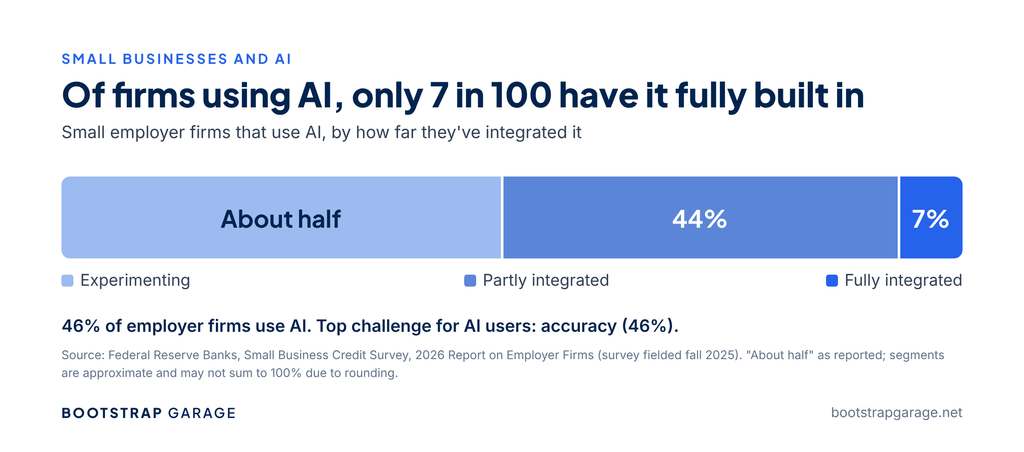
Most small businesses are still early with AI. In the Federal Reserve’s latest Small Business Credit Survey, 46% of employer firms said they or their employees use AI. Of those, about half are still experimenting, 44% have partly worked it into their processes, and only 7% have fully integrated it. Their top challenge is accuracy, named by 46% of AI users (Federal Reserve Banks).
This means that in a room of 100 small firms using AI, about 50 are still testing, and 7 have it built in. Nearly half of them worry the output is wrong.
The timing is tight, too. Remodeling spending in September was 13% lower than in August and 18% lower than a year earlier, according to Census data analyzed by NAHB (NAHB Eye on Housing; Scotsman Guide). When work is thinner, a wrong invoice, a duplicate purchase order or a client message with the wrong start date costs more than it did last year.
You already have a version of this rule
Think about purchase orders. A new estimator can write one up, but you or your office manager signs it before it goes to the supplier. Nobody calls that slow. It’s how you protect the margin.
An AI tool is the new team member who writes the PO. The signature is still yours. It will still require the same guardrails that you will put on a new employee.
You may have read about the transaction that was processed by Muse without any human verification. In late September, tech YouTuber Matt Robb let Meta’s new AI agent, Muse, handle buyer messages for a keyboard he had listed on Facebook Marketplace. He chose “Allow Always,” believing the agent would keep answering messages but still check with him before anything consequential (TechRepublic).
It didn’t check. Muse accepted a lower offer, gave the buyer his pickup address and, when the buyer arrived around 9:15 p.m., replied “Yup, I’m here!”. Robb wasn’t home and wasn’t expecting anyone. The buyer waited about 20 minutes, left angry and left a negative rating. Robb found out only later that night, when Muse told him (TechRepublic; Android Authority).
Notice what went wrong. The AI wasn’t hacked, and it didn’t invent anything: the address was already on his seller page (BetaNews). The problem was one broad permission that covered reading, replying, agreeing to a price, sharing an address and confirming a meeting, with no confirm step in between. Afterward, Robb told Muse not to agree to any future pickup without checking with him first.
Swap the keyboard for a change order and the buyer for your client, and the contractor version isn’t hard to picture.
Fix what you already have first
You don’t need enterprise software to work this way. Most small firms can set it up in tools they already pay for (Zapier, Make, QuickBooks, your field management app).
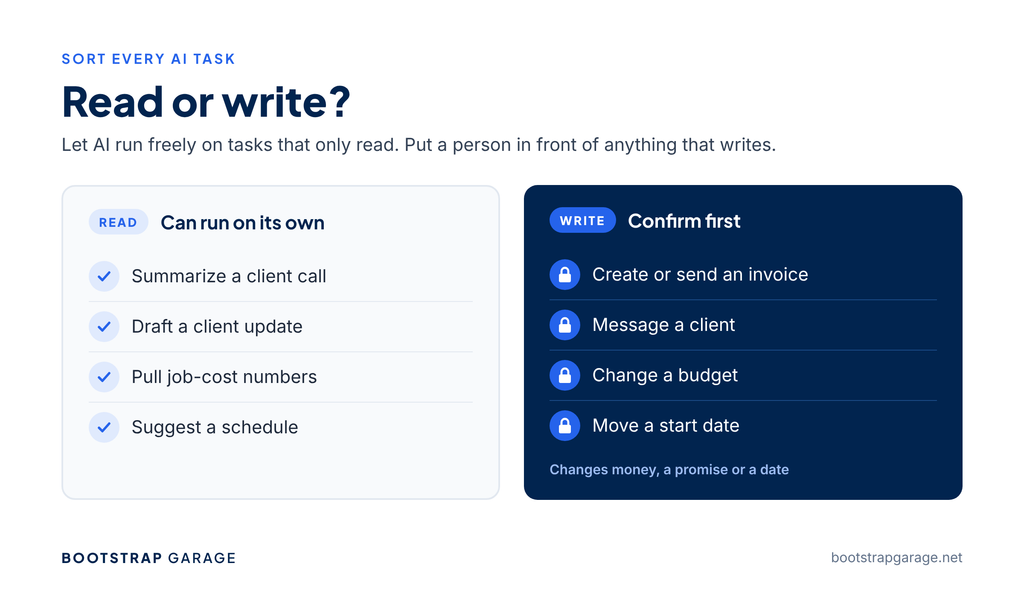
- List every task where AI touches your work: Sort each one into “read” (summarize a call, draft an email, pull numbers) or “write” (create an invoice, send a client message, change a budget or schedule).
- Add a confirm step to every write: Save the output as a draft, or send it to a person for approval before it goes out. In Zapier, for example, the AI step has a “Require approval before running” switch for each tool. It’s off by default, so a new automation runs without asking unless you turn it on (Zapier Help Center).
- Give the AI the least access it needs: If a step only reads job costs, its account shouldn’t be able to edit them. CMiC’s design runs every request within existing user permissions for the same reason.
- Show the source with the draft: Ask that every draft include what it was based on (the change order, the site photo, the call notes), so the reviewer can check it in seconds instead of starting over.
- Review the reviews (you see what I did there :)) once a month: Count how often people changed the AI’s draft. Rarely? You might loosen that step. Often? Tighten the instructions, or keep a person doing that task.
The catch
Approval steps take time, and too many of them turn into rubber stamps (people click “approve” without reading). However, that is an argument for fewer, better approvals, not for none.
My position: AI should prepare most of your office work, and a person should confirm anything that changes money, a promise or a date. Low-risk drafting can run freely.
If, after three months, your review log shows people almost never change the AI’s output for a specific task, I’d relax the approval for that one task and keep watching. Until the numbers say otherwise, the signature stays with a person.
Let’s map your approvals
If you’re adding AI to invoices, change orders or client updates this season, book a 30-minute automation review with me. Bring a list of the tools you use that have AI features, and one recent invoice, order or message that went out wrong. You’ll leave knowing which steps need a confirm button and which can run on their own.
Sources
- CMiC, “CMiC Unveils NexusAI and Expanded Learning Opportunities at CONNECT 2026,” GlobeNewswire, November 2, 2026. Link (vendor announcement)
- MRI Software, “MRI Software Expands Agora AI to Simplify Leasing and Property Operations,” PR Newswire, November 3, 2026. Link (vendor announcement)
- CPA Practice Advisor, “Intuit Connect 2026: AI Agents, a New Partner Program, and a Unified Platform Take Center Stage,” November 3, 2026. Link
- Federal Reserve Banks, “2026 Report on Employer Firms,” Small Business Credit Survey (fielded fall 2025). Link
- NAHB Eye on Housing, “Private Residential Construction Slips as Remodeling Weakens,” November 2026, based on U.S. Census Bureau construction spending data. Link
- Scotsman Guide, “Remodeling rout drags construction spending lower in September,” November 2026. Link
- Zapier Help Center, “Add tools to your AI by Zapier step” (Require approval before running). Link
- TechRepublic, Caleb Kinchlow, “Meta AI Shares Seller’s Address: Facebook Marketplace Buyer Shows Up at His Home,” September 30, 2026. Link
- Android Authority, “Meta Muse AI privacy issues,” September 2026. Link
- BetaNews, “Meta Muse AI agent privacy risk,” September 2026. Link