
Remodeling demand is holding up. NAHB’s Remodeling Market Index came in at 62 for the third quarter of 2026, up a point, with backlogs and new leads both rising. However, the jobs themselves are taking longer. NAHB’s chief economist, Robert Dietz, put it primarily on labor shortages, made worse by immigration enforcement and competition from data center construction, are extending the time it takes to finish projects.
If you run a remodeling company or a design-build studio, you already feel this. And I think the cost that hurts most isn’t on the schedule. It’s on the phone.
How Remodelers and Design-Build Studios can be efficient in managing Anxious Clients can lead to both, a better client experience as well as save valuable hours in a week; sometimes as much as one whole day every week.
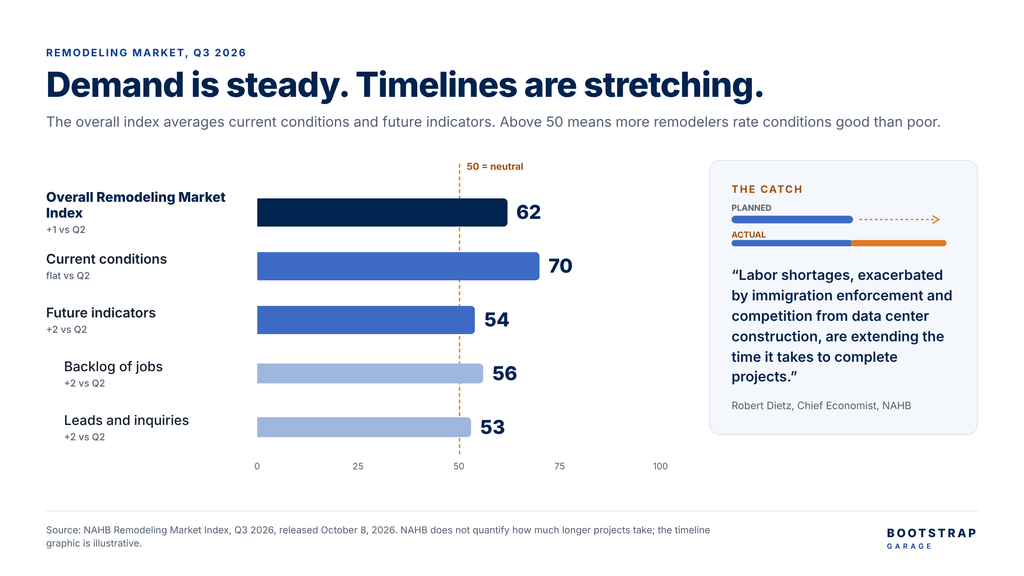
Busy is good. Slow is expensive.
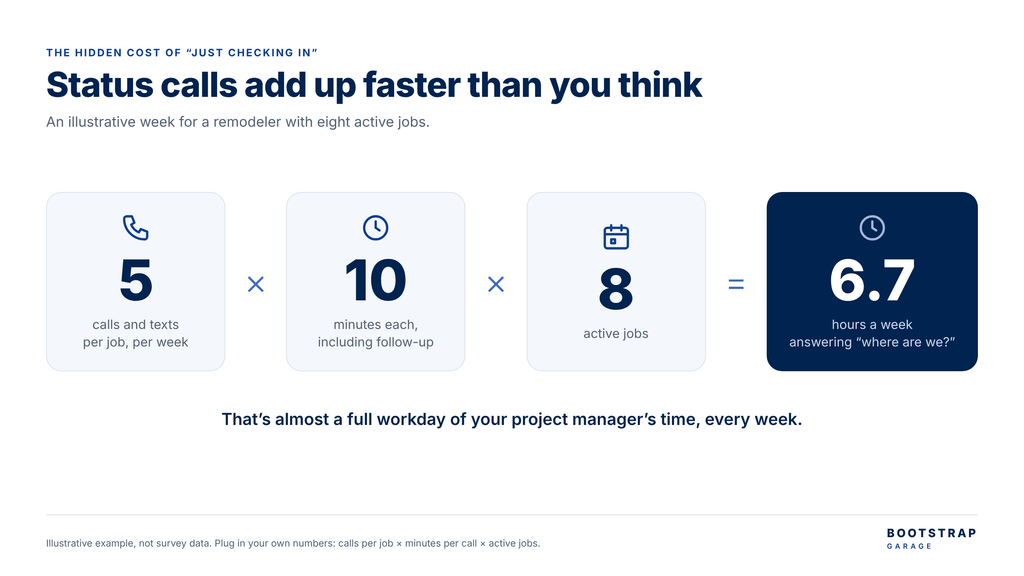
Every extra week a project runs, the client wants to know what’s happening, what’s next and what they need to decide. If the answer lives in your project manager’s head, a scheduling app the client can’t see and a text thread, each question pulls someone off real work.
Let’s put a number on it. Say each job generates five calls or texts a week, each takes ten minutes with the follow-up, and you have eight jobs running. That’s 400 minutes, or about 6.7 hours a week. Almost a full workday of your project manager’s time, spent answering “where are we?” (Your numbers will differ, so plug in your own.)
There’s a second cost. When a client is slow to pick a tile or approve a change order, the delay becomes your problem, and your schedule slips for a reason you didn’t control.
Think about the last package you ordered. You didn’t call UPS to ask where it was. You opened the tracking page. Your clients are spending tens of thousands of dollars on their homes. They deserve at least that much visibility, and your team deserves fewer calls.
What your client actually wants to know
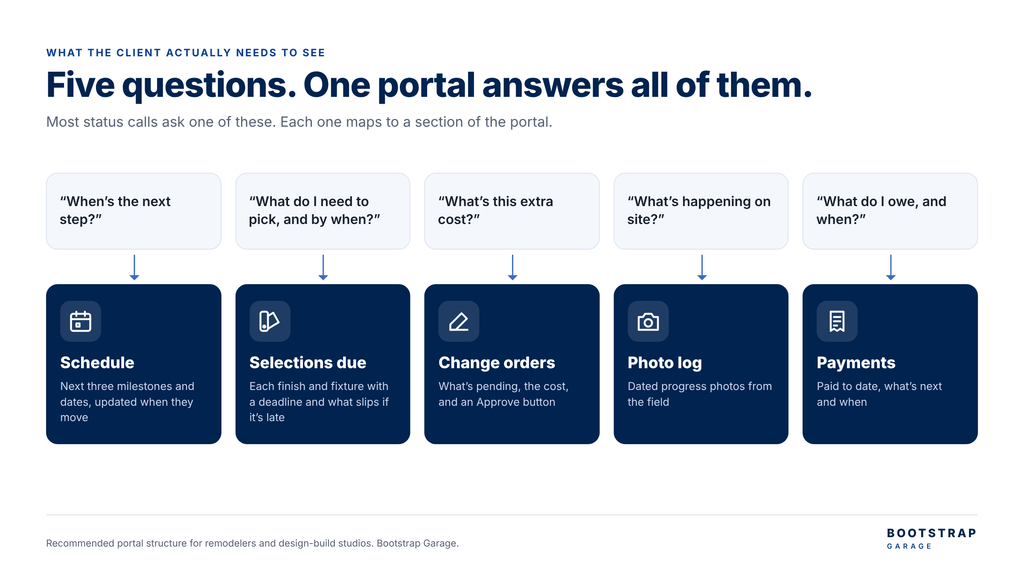
Most status calls ask one of five things. A simple portal can answer all of them:
- Schedule (“When’s the next step?”): the next three milestones and their dates, updated when they move.
- Selections due (“What do I need to pick, and by when?”): finishes, fixtures and furnishings the client must choose, each with a deadline and what happens if it’s missed.
- Change orders (“What’s this extra cost?”): what’s pending, the cost and an Approve button.
- Photo log (“What’s happening on site?”): dated progress photos from the field.
- Payments (“What do I owe, and when?”): what’s been paid, what’s next and when.
AI sped up the design, not the client
For interior design and design-build studios, the selections section matters most. Designers have embraced AI for the creative side. In Mattoboard’s 2025 State of AI in Interior Design survey of 328 interior design professionals, 62% used AI for visualization and 58% for concepting. Only 30% used it for client communication, and 22% for project management. And I don’t disagree with this approach. You want to keep your client interaction very personal.
That gap tells the story. The renderings got faster. Keeping the client on schedule didn’t. A beautiful concept doesn’t help much if the client takes three weeks to approve the backsplash. (One caveat: Mattoboard sells design software and surveyed designers worldwide, so I treat it as a signal, not a census.)
Use the site you already have
You don’t need a new platform. A password-protected page per project on your existing website can show all five sections.
The key is that nobody updates it by hand. The schedule and change orders come from the scheduling or project tool your team already uses, photos come from the field app, and payments come from your accounting system (like QuickBooks). Where those tools have an API or an integration, the portal reads from them. Where they don’t, a short weekly sync is enough to start.
You might ask: don’t construction platforms like Buildertrend or Houzz Pro already include a client portal? They do. If you already run your whole business in one of them, use its portal. That’s the right call, and I’d tell you so on a review call.
However, most of the remodelers and designers I talk to have their work spread across three or four tools and a text thread. Moving everything into a new platform mid-season is a bigger change than most small firms can absorb. A portal on your own site ties those tools together without asking anyone to switch, and it keeps your brand in front of the client.
Let the portal do the reminding
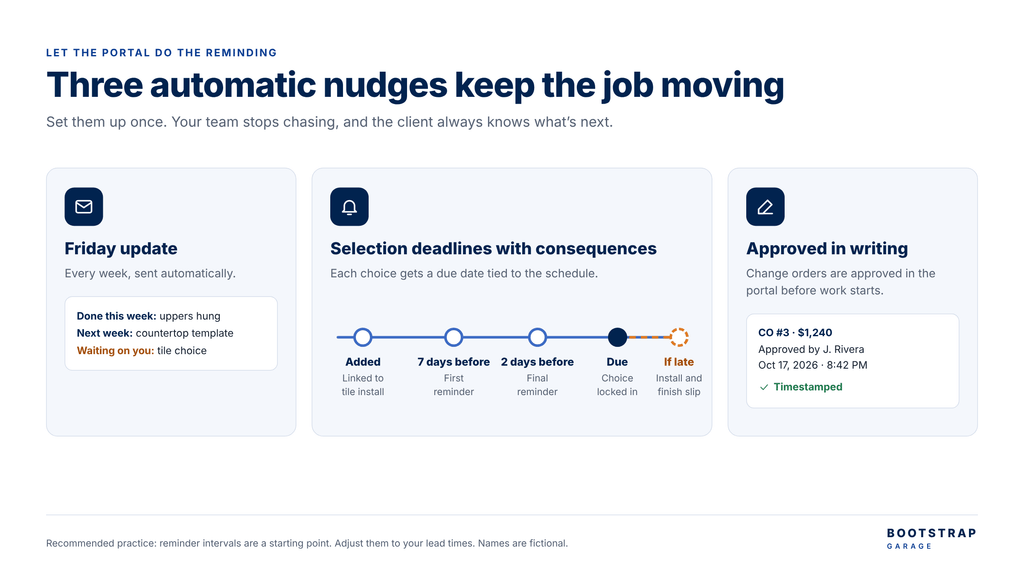
A portal only helps if the client looks at it. So don’t wait for them to log in. Set up three automatic nudges:
- A Friday update. Every week the client gets a short email: what was done, what’s next and anything waiting on them.
- Selection deadlines with consequences. Each selection gets a due date tied to the schedule, with reminders seven days and two days before, and a clear note on what slips if it’s late (“If the tile isn’t chosen by October 22, tile install and handover move back”).
- Change orders approved in writing. The client approves in the portal, with a timestamp, before work starts. No more disputes over a conversation on site.
The third one matters more than it looks. The most expensive change order I see is the one approved on site and never written down.
Three numbers to watch
You don’t have to take my word for any of this. Track three numbers across your next three projects:
- Status calls and texts per project per week
- Days from a change order being issued to appThree numbers to watchroved
- Days of delay caused by late client selections
Write down where you are today. If the portal is working, all three fall. If one doesn’t, you’ll know exactly which part of the setup to fix.
Longer timelines may not be in your control. How your clients experience them is.
Let’s look at your setup
If status calls are eating your week, let’s fix that. Bootstrap Garage builds client project portals on WordPress and connects them to the scheduling, field and accounting tools that remodelers and design studios already use. Book a 30-minute website and integration review, and I’ll show you what a portal for your projects could look like.
Sources
- NAHB: Remodeling market sentiment remains stable in third quarter despite headwinds (October 8, 2026)
- Mattoboard: State of AI in Interior Design report, via Office Insight (328 interior design professionals, surveyed July to September 2025)